Inkist1.2
Publisher Description
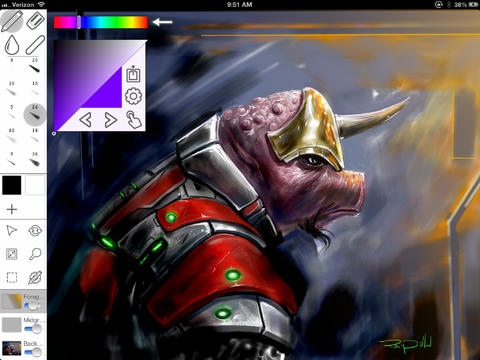
Inkist lets you paint on your iPad with highly customizable brushes and tools you expect from advanced painting software. Inkist eschews the trend of hiding interface elements from you, and presents you with everything you need up front. This minimizes the number of taps needed to switch between tools and provides you with a faster, more streamlined drawing experience.
FEATURES
Stylus pressure sensitivity with Wacom styluses, Adonit styluses, Pogo Connect, and preliminary support for Apple Pencil
Ability to screen out non-stylus touches with Adonit Jot Touch (Requires Jot Touch 4 or higher), Pogo Connect, and Wacom styluses.
Share layered files with Inkist/Inkist Lite Mac
Three layers with blend modes, opacity, and opacity locking settings
Export PNG, proprietary ISImage file formats, and individual layer files
CUSTOMIZABLE BRUSHES
Custom shape/pattern
Radius
Minimum radius (light stylus pressure, or beginning and end of stroke)
Radius jitter
Softness
Opacity
Minimum opacity
Opacity jitter
Flow
Scatter
Color jitter
Hue
Brightness
Saturation
Angle
Angle jitter
Make angle follow brush
Brush files compatible with Inkist on Mac
OTHER FEATURES
Blending tool
Dodge/Burn blending with customizable strength for highlights, mid tones, and temperature adjustment
Line tool
Selection tools
Hue saturation lightness controls
Luminance curves
Text tool
Image sizes up to 2048x2048
Option to move toolbar for a left-handed interface
Brush stroke mirroring
Guidelines
Screenshot artwork generously provided by:
1st: Ray Dillon: http://raydillon.com
2nd: iPad Creator: http://necojarashi.blogspot.com
3rd: http://kopiikat.deviantart.com
4th: http://hanzz.be
Requires iOS 9.1 or later. Compatible with iPad.
About Inkist
The company that develops Inkist is Tai Shimizu. The latest version released by its developer is 1.2.
To install Inkist on your iOS device, just click the green Continue To App button above to start the installation process. The app is listed on our website since 2013-05-23 and was downloaded 15 times. We have already checked if the download link is safe, however for your own protection we recommend that you scan the downloaded app with your antivirus. Your antivirus may detect the Inkist as malware if the download link is broken.
How to install Inkist on your iOS device:
- Click on the Continue To App button on our website. This will redirect you to the App Store.
- Once the Inkist is shown in the iTunes listing of your iOS device, you can start its download and installation. Tap on the GET button to the right of the app to start downloading it.
- If you are not logged-in the iOS appstore app, you'll be prompted for your your Apple ID and/or password.
- After Inkist is downloaded, you'll see an INSTALL button to the right. Tap on it to start the actual installation of the iOS app.
- Once installation is finished you can tap on the OPEN button to start it. Its icon will also be added to your device home screen.
